Installer Setup (ISU)
The following topics are for setting up through the ElitePRO™ Series Thermostat. If using the Resideo Technician App, follow the onscreen instructions on your smart device.
See Resideo Technician app for additional information on using the Resideo Technician app and using templates.
New Installation
-
After the thermostat has powered up, the display will ask you a few basic questions about the application, prompt you to link to an EIM and any Redlink 3.0 accessories if used. After doing that, you can use the App to set the rest of the settings or continue to do so on the thermostat.
-
After selecting the correct option for each setting, Touch NEXT at the bottom of the display to advance to the next option.
-
To see a list of all setup parameters, go to Installer Setup Options (ISU). The thermostat displays the ISU name, options and a brief description.
-
To finish setup and save your settings, touch DONE.
Revising Settings
THIS PRODUCT MUST BE INSTALLED BY A TRAINED, EXPERIENCED HVAC PROFESSIONAL. IMPROPER WIRING OR CONFIGURING OF THIS THERMOSTAT CAN CAUSE UNINTENDED OPERATION OF YOUR HVAC SYSTEM WHICH COULD LEAD TO PROPERTY DAMAGE, INJURY, INCLUDING DEATH.
If this is not a new installation and you want to access the Installer setup to change settings:
-
Touch the Menu icon (in the lower left of display).
-
Select Thermostat Information.
-
Write down the date code from that screen. Then touch BACK to go to previous screen.
-
Select Installer Options and enter date code.
-
Select Installer Setup.
-
After selecting the correct option for each setting, Touch NEXT at the bottom of the display to advance to the next option.
-
To finish setup and save your settings, touch DONE.
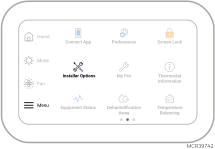
Installer Setup Options (ISU)
Firmware updates occur periodically which may allow for additional ISU settings or options in an ISU setting. If your thermostat does not have a setting shown in the chart, the firmware will update automatically once the thermostat has been registered to the app. Once registered the OTA update typically will happen within 15 minutes.
|
ISU # |
Heading |
Question |
Options |
Contingent previous setting? |
Notes |
|---|---|---|---|---|---|
|
1000 |
Language |
What language would you like to use? |
|
|
ISU number not displayed during initial setup |
|
1010 |
Application |
What type of installation will this thermostat be used for? |
|
|
|
|
None shown |
Room |
In what type of room will this thermostat be installed? |
|
Options shown vary for Residential or light commercial |
Only shown during initial setup |
|
1030 |
Home Screen |
Would you like the device name displayed on the home screen? |
|
1010 = Commercial |
|
|
No ISU number |
Redlink Devices? The thermostat will walk the installer through adding Redlink Devices. This includes the EIM, and Redlink wireless sensors if used. ElitePRO S900 models do not support Redlink and will not show this setting. |
||||
|
No ISU number |
Setup using app? The thermostat asks the installer whether they want to complete the setup using the app or directly on the thermostat. Using the Resideo Technician app allows the installer to apply a template containing settings from a previous ElitePRO Thermostat installation that were saved and shared by the company's administrator with installing Pros. |
||||
|
1050 |
Temperature Format |
Which temperature scale would you like to use? |
|
|
|
|
1055 |
Floor sensor |
Floor sensor |
|
|
If wired is selected, be sure to assign this to S terminals in ISU 5120 |
|
Outdoor Temperature |
(*Wireless automatically selected if sensor added during setup) |
Wireless only shown if C7089R3013 has been linked to thermostat during setup. |
|
||
|
2000 |
System Type |
System Type |
|
|
* The PTAC option is not available when the ElitePRO™ Series Thermostat is used with an EIM. |
|
2010 |
Equipment type |
Equipment type |
|
2000 = Conventional Forced Air Heat |
|
|
Equipment type |
|
2000 set to Heat Pump |
ISU 2010 not shown when ISU 2000 = PTAC |
||
|
Equipment type |
|
2000 = other |
|
||
|
Equipment type |
|
2000 set to Radiant Heat |
*Geothermal Radiant Heat allows you to set a radiant heat stage controlled by U prior to forced air heat and cool stages Not seeing these settings? See note at the top of this chart. |
||
|
Equipment type |
|
2000 = fan coil |
|||
|
2020 |
|
Number of Radiant Heat Stages |
|
2010 - Geothermal Radiant Heat |
Not seeing these settings? See note at the top of this chart. |
|
2030 |
|
Radiant Heat Stage 1 wiring |
|
2010 - Geothermal Radiant Heat. 2040 only shown if 2020 = 2
|
For more information, see Assigning Terminals. Not seeing these settings? See note at the top of this chart. |
|
2040 |
|
Radiant Heat Stage 2 wiring |
|||
|
2050 |
|
Geothermal Forced Air Control |
|
|
Not seeing these settings? See note at the top of this chart. |
|
2054 |
Fan coil |
Changeover sensor |
|
2010 = 2-pipe |
Method for thermostat to determine if pipe is hot or cold.
The 2-pipe FCU wiring diagrams show how this should be wired to the thermostat or EIM |
|
2055 |
Fan coil |
Changeover sensor setup |
|
2054 = dry contact |
|
|
2056 |
Fan coil |
Changeover wiring assignment |
|
2054 = 10K or 20K |
|
|
2060 |
Reversing Valve |
Reversing Valve |
|
2000 set to Heat Pump or PTAC, or 2050 = used for heating and cooling |
System setup is critical. If you are unsure of this setting, trace the O/B wire from thermostat to the equipment to verify the configuration. O/B wire goes to:
|
|
2070 |
Equipment stages |
Cool stages |
|
2000 set to other than Heat Pump |
3-4 only shown when an assignable terminal is available. U1-U3 on EIM, U at UWP. L at UWP for S1000, S1100 and S1200.
Only 1 cool stage for 2-pipe/4-pipe fan coil unit. |
|
Heat stages |
|
|
When EIM is not used, this is W3. Without EIM, the 3rd stage is only shown when an assignable terminal is available. U at UWP. L at UWP for S1000, S1100 and S1200. |
||
|
Radiant Heat Stages |
|
1055 set to Wired or 2000 = Radiant Heat |
|
||
|
Compressor Stages |
|
2000 set to Heat Pump |
|
||
|
Fan Coil Heat Stages |
|
2010 = Hot Water Fan Coil |
* Available stages may vary depending on what L or U are used for without EIM or what U1-U3 are used for with EIM |
||
|
Electric Forced Air Heat Stages |
|
2010 = Electric Forced Air |
* Available stages may vary depending on what L or U are used for without EIM or what U1-U3 are used for with EIM |
||
|
Fan coil stages |
|
2010 = 2-pipe or 4-pipe fan coil unit |
|
||
|
Backup Heat Stages |
|
2000 set to Heat Pump |
* Available stages may vary depending on what L or U are used for without EIM or what U1-U3 are used for with EIM |
||
|
2075 |
Radiant heat wiring |
Radiant heat Stage 1 wiring assignment |
|
ISU 2000 = Radiant |
See Assigning Terminals for information on assigning terminals. Not seeing these settings? See note at the top of this chart. |
|
2076 |
Radiant heat wiring |
Radiant heat Stage 2 wiring assignment |
|
ISU 2070 set for 2 radiant heat stages |
See Assigning Terminals for information on assigning terminals. Not seeing these settings? See note at the top of this chart. |
|
2080 |
Terminal assignment |
What terminals are wired to cool stage 3? |
|
2070 = 3 or 4 Cool stages |
See Wiring Diagrams for cool stage 3-4 wiring. During setup you can assign which terminals are used for cool stages 3-4. * Options vary based on which terminals are available. Thermostat L option only for S1000, S1100 and S1200 models. |
|
2090 |
Terminal assignment |
What terminals are wired to cool stage 4?
|
|
2070 = 4 Cool stages |
|
|
2100 |
Terminal Assignment |
What Terminals are Wired to Heat - Stage 3?
What Terminals are Wired to Fan Coil Heat - Stage 3? if ISU 2010: Heating Equipment Type = Hot Water Fan Coil
What Terminals are Wired to Radiant Heat - Stage 3? if ISU 2010: Heating Equipment Type = Hot Water Radiant Heat OR Hot Water Radiant Floor Heat |
|
Configured for 3 heat stages |
If EIM is used, this is not asked and the stage 3 heat wires to W3 on EIM. * Options vary based on which terminals are available. Thermostat L option only for S1000, S1100 and S1200 models. |
|
2105 |
Fan Control |
Fan stages |
|
2010 = 2-pipe, 4-pipe Fan Coil, or PTAC |
*During setup, The ElitePRO™ Series Thermostat instructs where to wire this to. There are also wiring diagrams in this file. If only 2 fan speeds are used, ISU 2106 will say High Speed rather than Medium Speed.
** Options vary based on which terminals are available. Thermostat L option only for S1000, S1100 and S1200 models. |
|
2106 |
Fan Coil |
Medium * Fan Speed Wiring Assignment |
|
2105 = 2 - 3 |
|
|
2107 |
Fan Coil |
High * Fan Speed Wiring Assignment |
|
2105 = 3 |
|
|
2110 |
Fan Control |
Fan Operation in Heat |
|
2010 = Electric Forced Air, Hot water fan coil, or other, |
|
|
2130 |
Backup heat stages |
Backup heat stages |
|
2000 = Radiant and 2120 = other than None |
|
|
2150 |
Backup Heat operation |
Backup Heat operation |
|
2010 = Electric forced air or Hot Water Fan Coil or other and 2130 = other than 0 |
|
|
2160 |
Fan Control |
Backup Heat Fan Control |
|
If (ISU 2010: Heating Equipment Type = Hot Water Radiant Heat or Hot Water Radiant Floor Heat or Steam or Other AND ISU 2120: Backup Heat Type = Hot Water Fan Coil or Electric Forced Air or Other AND ISU 2110: Fan Operation in Heat = No Fan) OR (ISU 2120: Backup Heat Type = Hot Water Fan Coil or Electric Forced Air or Other AND ISU 2150: Backup Heat Operation = Not Allowed to Run with <Heating Equipment Type>) |
|
|
2170 |
Terminal Assignment |
What terminals are wired to Stage 1 backup heat? |
|
Options available depend on thermostat firmware version and whether an EIM is used. The default for backup heat stage 1 is Thermostat AUX when EIM is not used and EIM AUX 1 when EIM is used. The default for backup heat stage 2 is EIM AUX 2 when EIM is used. This setting is available for unique applications such as:
When an EIM is used, Aux 1 terminal is always energized with a call for backup heat stage 1 and Aux 2 terminal is always energized with a call for backup heat stage 2. If the backup heat stage is wired/configured to thermostat U or L. We would not expect a wire to the EIM Aux 1 or Aux 2 so this should not matter. |
|
|
2171 |
Terminal Assignment |
What terminals are wired to stage 2 backup heat (when two backup heat stages are selected) |
|
||
|
2175 |
Backup Heat |
Aux/E Terminal Control |
|
2070 Backup Heat stages = 1* |
*Not an option when EIM is used or if set for 2 backup heat stages or if 2170 is not set to Aux. |
|
2180 |
Backup Heat |
Backup Heat Type |
|
2000 set to Heat Pump and 2070 Backup Heat Stages set to 1 |
|
|
2185 |
Emergency Heat |
Emergency Heat Type |
|
2175 = independent |
*Not an option when EIM is used. |
|
2190 |
External Fossil Fuel Kit |
External Fossil Fuel Kit |
|
2000 = heat pump, 2180 = Gas or oil forced air |
|
|
2200 |
Backup Heat Operation |
Backup Heat Operation |
|
2180 set for Hot Water or Other |
|
|
2205 |
Emergency Heat Operation |
Emergency Heat Operation |
|
2150 set for Hot Water or Other |
*Not an option when EIM is used. |
|
2210 |
Fan Control |
Aux backup heat fan control |
|
ISU 2180: Backup Heat Type = Other AND ISU 2190: External Fossil Fuel Kit = Thermostat Controls Backup Heat |
|
|
2215 |
Fan Control |
Emergency heat fan control |
|
ISU 2185: Emergency Heat Type = Hot Water Fan Coil OR ISU 2185: Emergency Heat Type = Other |
|
|
2216 |
Economizer/ Time of Day |
Economizer / Time of Day |
|
1010 = Light Commercial |
|
|
2217 |
Economizer |
What terminals are wired to the Economizer output? |
|
2216 = Economizer |
See wiring diagrams for Economizer |
|
2218 |
Time of Day |
What terminals are wired to the Time of Day output? |
|
2216 = Time of Day |
See wiring diagrams for Time of Day |
|
2220 |
L Terminal alert |
What is the L Terminal used for?* |
|
Options shown if ISU 2000 = heat pump or 2216= Economizer. If 2054 = Dry Contact, then 2220 is not shown |
* There are uses for L on the thermostat beyond the options listed here. It can be set to trigger remote setback or used with an aquastat for cool/heat changeover on a 2-pipe fan coil. S1000, S1100 and S1200 models allow you to use L for an extra heat or cool stage or to control a humidifier, dehumidifier or ventilator. Once L has been assigned, the other options for this terminal will not be shown in the ISU settings. **When Heat Pump Failure alert is active, thermostat runs only backup heat. Not seeing these settings? See note at the top of this chart. |
|
2230 |
Control mode |
Control Mode |
|
1055 set to Wired |
No Floor only option if there is a Cool stage or Backup Heat stage. |
|
2240 |
Occupancy sensing |
Remote Setback |
|
* Thermostat L terminal shown when no EIM is enrolled, Dry Contact shown when EIM is enrolled. |
See Remote Setback (Occupancy Setback / Occupancy Sensor)
|
|
3000 |
Changeover |
Changeover |
|
Any system with at least 1 Heat stage and 1 Cool stage |
See Auto Changeover Operation for Details. |
|
3015 |
Auto Changeover Differential |
0-5F (0.00 to 2.50C) |
3000= auto |
|
|
|
3020 |
Staging control |
Finish with high cool stage |
|
At least 2 cool/compressor stages |
|
|
3021 |
Staging control |
Finish with high heat stage |
|
At least 2 heat stages |
|
|
3030 |
Staging control |
Cool differential stage 2 |
|
2070 set to at least 2 cool/compressor stages |
Options for stage 3 and 4 differential are limited by the setting for the previous cool stage differential setting |
|
Cool differential stage 3 |
2070 set to at least 3 cool stages |
||||
|
Cool differential stage 4 |
2070 set to 4 cool stages |
||||
|
3050 |
Staging control |
Radiant heat differential |
|
There are 2 stages of radiant heat selected for 2070. |
|
|
Heat Differentials |
|
2000 = Conventional Forced air + 2070 = 2 or 3 |
|
||
|
2000 = Conventional Forced air + 2070 = 3 |
|
|||
|
3060 |
Staging control |
Compressor Heat Differential Stage 2 |
|
2000 = Heat Pump and 2070 Compressor stages = 2 |
|
|
3080 |
Staging control |
Backup Heat differentials |
Stage 1:
|
Radiant heat with 1 or 2 backup heat stages |
*If 2 stages of backup heat. The 2nd backup stage is forced to be at least .5 degrees higher than first stage Backup Heat. |
|
Stage 2:
|
Radiant heat with 2 backup heat stages |
||||
|
3090 |
Staging control |
Backup Heat differentials |
Stage 1:
|
Heat pump of FCU with 1 or 2 backup heat stages |
*Comfort setting not available for Dual Fuel.
See section on Backup heat differentials, Upstage Timer, and Holdoff Timer.
For an FCU, the thermostat will automatically switch to Em Heat mode and run the backup heat if the thermostat had been in heat mode and pipe sensor detects pipe is no longer in the heat temperature threshold.
If you don’t want to switch to the backup heat when that pipe is warm, set a high Differential setting and set the timers to the maximum settings. |
|
Stage 2:
|
Heat pump selected with 2 Backup Heat stages |
||||
|
3110 |
Staging control |
Backup heat upstage timer |
|
If configured for an auxiliary head stage. |
|
|
Backup Heat holdoff timer |
|
Upstage timer set to other than “Off”. |
|||
|
3120 |
Equipment Lockouts |
Compressor Lockout/Balance point |
|
Configured for heat pump with an Aux Heat stage |
|
|
Backup Heat Lockout |
|
|
|||
|
3125 |
Equipment Lockouts |
Fan Lockout after cool call ends |
|
2070 = at least 1 cool/compressor stage |
This feature is desired by some customers in humid regions who want to restrict the fan when the coil is wet after a coolling call ends. |
|
3130 |
Cycle rates |
Radiant heat cycle rate (stage 1) |
1-12 |
At least one radiant heat stage |
|
|
Radiant heat cycle rate (stage 2) |
1-12 |
Two radiant heat stages |
|
||
|
3140 |
Cycle rates |
Cool Cycles Per hour |
Stage 1:
|
2000 = other than heat pump. 2070 = 1 - 4 |
|
|
Stage 2:
|
2000 = other than heat pump. 2070 = 2 - 4 |
|
|||
|
Stage 3:
|
2070 = 3 - 4 |
|
|||
|
Stage 4:
|
2070 = 4 |
|
|||
|
Compressor Cycles Per Hour |
Stage 1:
|
2000 = heat pump |
|
||
|
Stage 2:
|
2000 = heat pump, 2070 = 2 |
|
|||
|
3150 |
Cycle rates |
Radiant Heat cycles per hour |
Stage 1
|
At least 1 Radiant Heat stage |
|
|
Stage 2
|
2 Radiant Heat stages |
|
|||
|
Heat Cycles per hour |
Stage 1
|
2000 = Conventional Forced Air, or Other |
|
||
|
Stage 2
|
2000 = Conventional Forced Air and 2070 = 2-3 heat stages |
|
|||
|
Stage 3
|
2000 = Conventional Forced Air and 2070 = 3 heat stages |
|
|||
|
3160 |
Cycle rates |
Backup heat cycles per hour (Stage 1) |
Settings 1-12 |
At least 1 Backup Heat stage selected |
|
|
Backup heat cycles per hour (Stage 2) |
Settings 1-12 |
2 Backup Heat stages selected |
|
||
|
3240 |
Temperature Control |
Minimum Compressor or Fan Coil Off Time |
Settings:
|
|
|
|
3250 |
Temperature Control |
Minimum non-compressor on time |
|
2000 = Radiant Heat |
|
|
3260 |
Temperature Control |
Extended fan run time in cool |
|
At least 1 cool stage |
|
|
Extended fan run time in heat |
At least 1 heat stage |
|
|||
|
3300 |
Temperature Control |
Temperature Balancing |
|
|
|
|
3310 |
Temperature Control |
Temperature Balancing Room Delta |
|
|
|
|
3320 |
Fan Control |
Fan Modes Allowed |
|
2105 = 2 or 3 |
For settings and options: |
|
3325 |
Fan Control |
Start Fan on the Highest Stage |
|
2105 = 2 or 3 |
|
|
3340 |
Fan Control |
Fan reset to Auto Mode timer |
|
2010 = 2-pipe or 4-pipe |
|
|
3500 |
Thermostat relays mimic |
Enable Thermostat |
|
EIM is enrolled to Redlink thermostat that has onboard Y, Y2, G, W, W2 relays |
See Mimicking Relays for more information. Not seeing these settings? See note at the top of this chart.
|
|
4010 |
Fan Control |
Pre-Occupancy Purge Duration |
|
1010 = Light Commercial |
Run fan prior to occupied period |
|
4020 |
Type of Override |
Type of Override |
|
1010 = Light Commercial |
See description in Commercial Features |
|
4030 |
Override Duration |
Override Duration |
|
1010 = Light Commercial |
|
|
4050 |
Temperature Control |
Minimum Heat Recovery Ramp Rate |
|
1010 = light commercial.
1060 (Outdoor Temperature) must be set to other than “None”, to see the outdoor temp settings for 4050-4080.
If set to “Wired”, 5050 must also be set to other than “None”
|
Off: The heating system will begin recovery at the time that is scheduled. When a Minimum Recovery Ramp Rate is set, the thermostat will begin recovery early to ensure the temperature is reached at the scheduled time. Set a Minimum Recovery Ramp Rate based on the rate that the heating system can recover at for a cold day in your region. Default setting is 5° F / hour. If an outdoor sensor is installed, set an Outdoor Temperature that is representative of a cold day in your region to be associated with the Minimum Recovery Ramp Rate. The thermostat will begin recovery at the optimal time based on a calculated ramp rate, allowing the system to recover on time and save energy during changing outdoor conditions. During recovery, the setpoint changes at a rate in degrees per hour depending on the outdoor temperature. If there is no outdoor sensor, the Minimum Recovery Ramp Rate is used |
|
Outdoor Temperature used with Minimum Heat Recovery Ramp Rate |
|
||||
|
4060 |
Temperature Control |
Maximum Heat Recovery Ramp Rate |
|
1010 = light commercial.
1060 (Outdoor Temperature) must be set to other than “None”, to see the outdoor temp settings for 4050-4080.
If set to “Wired”, 5050 must also be set to other than “None” |
Off: The heating system will begin recovery at the time that is scheduled. When a Maximum Recovery Ramp Rate is set, the thermostat will begin recovery early to ensure the temperature is reached at the scheduled time. Set a Maximum Recovery Ramp Rate based on the rate that the heating system can recover at for a mild day in your region. Default setting is 8° F / hour. Set an Outdoor Temperature that is representative of a mild day in your region to be associated with the Maximum Recovery Ramp Rate. The thermostat will begin recovery at the optimal time based on a calculated ramp rate, allowing the system to recover on time and save energy during changing outdoor conditions. During recovery, the setpoint changes at a rate in degrees per hour depending on the outdoor temperature. |
|
Outdoor Temperature used with Maximum Heat Recovery Ramp Rate |
|
||||
|
4070 |
Temperature Control |
Minimum cool Recovery Ramp Rate |
|
1010 = light commercial.
1060 (Outdoor Temperature) must be set to other than “None”, to see the outdoor temp settings for 4050-4080.
If set to “Wired”, 5050 must also be set to other than “None”
|
Off: The cooling system will begin recovery at the time that is scheduled. When a Minimum Recovery Ramp Rate is set, the thermostat will begin recovery early to ensure the temperature is reached at the scheduled time. Set a Minimum Recovery Ramp Rate based on the rate that the cooling system can recover at for a hot day in your region. Default setting is 3° F / hour. If an outdoor sensor is installed, set an Outdoor Temperature that is representative of a hot day in your region to be associated with the Minimum Recovery Ramp Rate. The thermostat will begin recovery at the optimal time based on a calculated ramp rate, allowing the system to recover on time and save energy during changing outdoor conditions. During recovery, the setpoint changes at a rate in degrees per hour depending on the outdoor temperature. If there is no outdoor sensor, the Minimum Recovery Ramp Rate is used. |
|
Outdoor Temperature used with Minimum cool Recovery Ramp Rate |
|
||||
|
4080 |
Temperature Control |
Maximum cool Recovery Ramp Rate |
|
1010 = light commercial.
1060 (Outdoor Temperature) must be set to other than “None”, to see the outdoor temp settings for 4050-4080.
If set to “Wired”, 5050 must also be set to other than “None”
|
Off: The cooling system will begin recovery at the time that is scheduled. When a Maximum Recovery Ramp Rate is set, the thermostat will begin recovery early to ensure the temperature is reached at the scheduled time. Set a Maximum Recovery Ramp Rate based on the rate that the cooling system can recover at for a mild day in your region. Default setting is 6° F / hour. Set an Outdoor Temperature that is representative of a mild day in your region to be associated with the Maximum Recovery Ramp Rate. The thermostat will begin recovery at the optimal time based on a calculated ramp rate, allowing the system to recover on time and save energy during changing outdoor conditions. During recovery, the setpoint changes at a rate in degrees per hour depending on the outdoor temperature.
|
|
Outdoor Temperature used with Maximum cool Recovery Ramp Rate |
|
||||
|
4090 |
Temperature Control |
Adaptive Intelligent Recovery |
|
|
|
|
4100 |
Temperature Limits |
Temperature range stops |
Minimum cool setpoint; 50F-99F (10C-37C) |
At least 1 stage of cool |
There is a correlation between these settings. For example, if minimum cool is set to 50F, minimum heat cannot be set above 40F |
|
Maximum cool setpoint; 90F-99F (32C-37C) |
At least 1 stage of cool |
||||
|
Minimum heat setpoint; 40F-50F (4.5C-10C) |
At least 1 stage of Heat |
||||
|
Maximum heat setpoint; 40F-90F (4.5 - 32.0C) |
At least 1 stage of Heat |
||||
|
4110 |
Keypad Lockout |
Keypad Lockout |
Unlocked, Partially Locked, Fully Locked |
|
|
|
4150 |
Alert Settings |
High Indoor temperature Alert |
Off, 32 to 99°F in 1°F increment
Off, 0.0 to 37.0°C in 0.5°C increment |
|
These are not restrictions for temperature settings. Those are in ISU 4100. These are high and low indoor temperature and humidity ranges which will generate an alert message on display and in app. |
|
Low Indoor temperature Alert |
Off, 31 to 98°F in 1°F increment
Off, -0.5 to 36.5°C in 0.5°C increment |
|
|||
|
4154 |
High Indoor humidity Alert |
Off, 6 to 99% rH |
|
||
|
Low Indoor humidity Alert |
Off, 5 to 98% rH |
|
|||
|
5000 |
Sensors |
What sensors are WIRED to your system? |
|
Floor sensor only shown here if 1055 is set to Wired. Fan Coil Changeover Temperature only shown if 2054 = 10k or 20k |
|
|
5020 |
Sensors |
What Terminals are Wired to the Indoor Temperature Sensor? |
|
5000 has Indoor Sensor selected |
Options depend on whether EIM is used. |
|
5030 |
Sensors |
Indoor Temperature Sensor Type |
|
5000 has Indoor Sensor selected |
|
|
5040 |
Sensors |
Which Sensors will be used for TEMPERATURE Control? (Multiple sensors are averaged) |
|
5000 set for Wired Indoor Sensor |
This setting does not pertain to wireless indoor sensors. |
|
5050 |
Sensors |
What Terminals are Wired to the Outdoor Air Temperature Sensor? |
|
1060 set to Wired |
Options depend on whether EIM is used. |
|
5070 |
Sensors |
What Terminals are Wired to the Return Air Temperature Sensor? |
|
5000 has Return Sensor selected |
Options depend on whether EIM is used. |
|
5080 |
Sensors |
Return Temperature Sensor Type |
|
5000 has Return sensor selected |
|
|
5090 |
Sensors |
What Terminals are Wired to the Discharge Air Temperature Sensor? |
|
5000 has Discharge Sensor selected |
Options depend on whether EIM is used. |
|
5100 |
Sensors |
Discharge Temperature Sensor Type |
|
5000 has Discharge Sensor selected |
|
|
5110 |
Sensors |
A-Coil Low Temperature Cutoff |
|
At least 1 cool stage |
|
|
5120 |
Sensors |
What Terminals are Wired to the Floor Temperature Sensor? |
|
1055 set to “Wired” |
Options depend on whether EIM is used. |
|
5150 |
Floor Temperature Limits |
Minimum Limit |
Minimum Limit = 40°F-89°F (4.5°C to 31.5°C) |
ISU 2230 = |
Top range affected by Maximum limit setting |
|
Maximum Limit |
Maximum Limit = 50°F-99°F (10.0°C to 37.0°C) |
Bottom range affected by Minimum limit setting |
|||
|
5160 |
Floor Economy Mode |
Floor Economy Mode |
|
5000 has Floor Sensor selected |
If enabled, Low Floor Temperature Limit (ISU 5150) will be disabled during Away and Sleep period. This ISU is only displayed if Temperature Control Mode (ISU 2230) is set to AF mode. |
|
5170 |
Freeze Protection |
Freeze Protection |
(Off only available for non-radiant systems) |
Cannot be below minimum setting in 5150 (if used). |
The thermostat operates the heat whenever the room temperature falls below that limit, even when the system is set to off. Default setting is Off (disabled) for non-radiant systems and 40°F (4.5°C) for radiant systems. Freeze protection temperature cannot be set above ISU 5150 minimum setting. |
|
5200 |
Changeover Setup |
Temperature Thresholds |
|
5000 = Fan coil changeover |
|
|
6000 |
Dry Contacts |
Select the Dry Contacts in the System |
|
|
See Dry Contact Alerts (ISU 6000 - 6220) for operation details |
|
6005 |
Custom Dry Contact alerts |
Select Custom Dry Contact alerts |
|
|
See Dry Contact Alerts (ISU 6000 - 6220) for operation details |
|
6010 |
Dry Contacts |
What terminals are wired to the Remote Setback Dry Contact? |
|
6000 = Remote Setback |
|
|
6020 |
Dry Contacts |
Remote Setback Dry Contact Setup |
|
2240 = THERMOSTAT L or DRY CONTACT. For DRY CONTACT setting, 6010 assigned to S terminals. |
|
|
6030 |
Dry Contacts |
Remote Setback Time Delayed from Occupied to Standby |
0 Minutes to 30 Minutes in 5 minute increments |
2240 set to other than "NONE" |
|
|
6040 |
Dry Contacts |
Remote Setback – Standby Cool Setpoint |
72°F - 90°F (22.0° - 32.0°C) |
||
|
Remote Setback – Standby Heat Setpoint |
50°F - 70°F (10.0° - 21.0°C) |
||||
|
6050 |
Dry Contacts |
What terminals are wired to the Full Drain Pan Alert dry contact? |
|
6000 has full drain pan selected |
See Dry Contact Alerts (ISU 6000 - 6220) for operation details |
|
6060 |
Dry Contacts |
Full Drain Pan Alert dry contact setup |
|
6000 has full drain pan selected |
|
|
6065 |
Dry Contacts |
Full Drain Pan Alert dry contact actions |
Check box for each:
|
6000 has Full Drain Pan selected |
|
|
6070 |
Dry Contacts |
What terminals are wired to the Dirty Filter Alert dry contact? |
|
6000 has Dirty Filter Alert selected |
|
|
6080 |
Dry Contacts |
Dirty Filter Alert dry contact setup |
|
||
|
6090 |
Dry Contacts |
What terminals are wired to the Water Leak Alert dry contacts? |
|
6000 has water leak selected |
See Dry Contact Alerts (ISU 6000 - 6220) for operation details |
|
6100 |
Dry Contacts |
Water Leak Alert dry contact setup |
|
6000 has water leak selected |
|
|
6110 |
Dry Contacts |
What terminals are wired to the System Shutdown Alert dry contact? |
|
6000 has system shut down alert selected |
See Dry Contact Alerts (ISU 6000 - 6220) for operation details |
|
6120 |
Dry Contacts |
System shut down alert dry contact setup |
|
||
|
6130 |
Dry Contacts |
What terminals are wired to the Service Needed Alert dry contact? |
|
6000 has Service Needed Alert selected |
See Dry Contact Alerts (ISU 6000 - 6220) for operation details |
|
6140 |
Dry Contacts |
Service Needed Alert dry contact setup |
|
||
|
6150 |
Dry Contacts |
What terminals are wired to the Fan Failure Alert dry contact? |
|
6000 has Fan Failure Alert selected |
See Dry Contact Alerts (ISU 6000 - 6220) for operation details |
|
6160 |
Dry Contacts |
Fan Failure Alert dry contact setup |
|
||
|
6190 |
Dry Contacts |
What terminals are wired to the custom alert 1 dry contact? |
|
6005 has custom alert 1 selected |
See Dry Contact Alerts (ISU 6000 - 6220) for operation details |
|
6200 |
Dry Contacts |
Custom alert 1 dry contact setup |
|
||
|
6210 |
Dry Contacts |
Custom Alert 1 Name |
Type in the alert name |
||
|
6215 |
Dry Contacts |
Show custom alert 1 message |
|
||
|
6220 |
Dry Contacts |
Custom Alert 1 Message |
Type in the message displayed when this alert is active |
6215 set to Yes |
See Dry Contact Alerts (ISU 6000 - 6220) for operation details |
|
6230 |
Dry Contacts |
Custom alert 1 actions |
|
6005 has custom alert 1 selected |
|
|
6240 |
Dry Contacts |
What terminals are wired to custom U contact? |
|
6230 has custom U terminal selected |
When the switch wired to the S for Dry Contact Alert activates, the custom U contacts will change state to activate or shut off whatever is wired to those terminals |
|
6250 |
Dry Contacts |
Custom U dry contact name |
Type in the name of whatever the custom U Dry Contact is controlling |
||
|
6260 |
Dry Contacts |
Custom U dry contact setup |
|
||
|
6300 - 6370 |
These are duplicate settings to 6190-6260 but for Dry Contact Alert 2 (if selected) |
6005 has custom Dry Contact Alert 2 selected |
|
||
|
6400 - 6470 |
These are duplicate settings to 6190-6260 but for Dry Contact Alert 3 (if selected) |
6005 has custom Dry Contact Alert 3 selected |
|
||
|
6500-6570 |
These are duplicate settings to 6190-6260 but for Dry Contact Alert 4 (if selected) |
6005 has custom Dry Contact Alert 4 selected |
|
||
|
6600 |
Dry contacts |
Cool Lockout Delay Time |
|
6230, 6340, 6440, or 6540 set to lock out cool |
See Dry Contact Alerts (ISU 6000 - 6220) for operation details |
|
6610 |
Dry contacts |
Cool lockout maximum indoor temperature |
|
||
|
6620 |
Dry contacts |
Heat Lockout Delay Time |
|
6230, 6340, 6440, or 6540 set to lock out Heat |
|
|
6630 |
Dry contacts |
Heat lockout minimum indoor temperature |
|
||
|
6640 |
Dry contacts |
Minimum Off Time |
|
6230, 6340, 6440, or 6540 set to lock out Heat or Cool |
|
|
7000 |
Filtration |
Filter type |
|
|
|
|
7020 |
Filtration |
Number of air filters |
|
7000 = media |
|
|
7110 |
Filtration |
Replacement reminders |
Air Filter 1 settings
|
7020 = 1 or 2 |
|
|
|
|||||
|
7120 |
Filtration |
Electronic Air Cleaner Reminders |
Clean cells, options:
|
7000 = electric |
|
|
Clean Pre-filters, options:
|
|
||||
|
Replace Post-filters, options:
|
|
||||
|
8000 |
Humidification |
What type of humidifier do you have? |
|
U contacts available |
|
|
8010 |
Humidification |
What sensors will be used for Humidification control |
|
8000 = other than None and Wireless sensor(s) are connected to thermostat |
* The name of each wireless sensor that is paired with the thermostat will be displayed and selectable. |
|
8030 |
Humidification |
What terminals are wired to the humidifier? |
|
8000 = other than "none". |
Thermostat L option on S1000, S1100 and S1200 models only. |
|
8050 |
Humidification |
Humidification Window Protection |
|
1060 and 8000 = other than "none". |
See Window Protection for more details |
|
8060 |
Humidification |
System modes allowing humidification |
|
1600 is other than "none". |
8000 = other than "None". (Cool option only when discharge sensor selected ISU 5000) |
|
8070 |
Humidification |
Humidification control |
|
8000 set to other than None |
|
|
8080 |
Humidification |
Humidifier Lockout |
|
8060 set to Cool |
|
|
8095 |
Humidification |
Humidifier Lockouts Dry Contacts |
|
8000 = steam, by-pass or fan powered, and 6000 = full drain pan or water leak, OR 6005 is set for custom Dry Contact Alert |
This will lock out the humidifier when the associated Dry Contact Alert is active |
|
8100 |
Humidification |
Humidifier Pad replacement reminder |
|
Not shown if 8000 = none or steam |
|
|
8100 |
Humidification |
Clean tank/Water Filter replacement Reminder |
|
8000 = steam |
|
|
9000 |
Dehumidification |
What type of dehumidification equipment do you have? |
Residential:
Commercial:
|
A/C with low speed fan, Dehumidifier/Whole House Dehumidifier and Hot Gas Bypass only shown if U contacts available (or thermostat L on some models) |
|
|
9005 |
Dehumidification |
Dehumidification Fan speed priority |
|
9000 = A/C with Low Speed Fan |
|
|
9010 |
Dehumidification
|
What sensors will be used for Dehumidification control |
|
9000 = other than "none". |
* The name of each wireless sensor that is paired with the thermostat will be displayed and selectable. |
|
9040 |
Dehumidification
|
What terminals are wired to the dehumidification equipment? |
|
9000 = other than "none" or "A/C with High Speed Fan" |
Thermostat L option on S1000, S1100 and S1200 models only. |
|
9050 |
Dehumidification |
Dehumidification Equipment Setup |
|
9000 = Low Speed Fan or Hot Gas Bypass |
Most furnaces/air-handlers use a normally-closed switch that opens to dehumidify. |
|
9070 |
Dehumidification
|
Dehumidification - Overcooling Limit |
|
9000 = A/C with High or Low Speed Fan |
If Celsius is selected in ISU 1050, the Celsius temperatures seen in the Options column at left are presented. |
|
9080 |
Dehumidification |
Control Method |
|
ISU 1010 = commercial and 9000 = AC with high speed fan, AC with low speed fan, or Hot gas bypass. |
|
|
9090 |
Dehumidification
|
Dehumidification Minimum On Time |
|
9080 = other than Basic |
|
|
9100 |
Dehumidification
|
High Humidity Comfort Reset Setting |
0°F - 5°F in 1°F increments 0°F - 2.5°C in 0.5°C increments. |
9080 = one of the Comfort Reset settings |
|
|
9120 |
Dehumidification
|
System modes allowing dehumidification |
|
9000 - Whole House Dehumidifier |
|
|
9130 |
Dehumidification
|
Dehumidifier Fan Control |
|
9000 - Whole House Dehumidifier |
|
|
9140 |
Dehumidification
|
Dehumidifier Lockout |
|
9000 - Whole House Dehumidifier |
|
|
9145 |
Dehumidification
|
Dehumidifier lockout dry contact |
Custom Alert 1 - Custom Alert 4 (options depend on 6005 settings) |
ISU 6005 is set for a custom dry contact alert |
If enabled, the dehumidifier will lock out whenever the selected Dry Contact Alert is active |
|
9180 |
Dehumidification
|
Dehumidification - Away mode |
|
|
|
|
9190 |
Dehumidification
|
Dehumidification Away mode Fan Control |
|
9180 = allowed |
|
|
9200 |
Dehumidification
|
Dehumidification Away mode low limit temperature setting |
70°F to 80°F in 1°F increments.
21.0 to 26.5°C in 0.5°C or 1.0°C increments (depends on rounding) |
9180 = allowed |
The dehumidification Away mode setting can restrict this |
|
Dehumidification Away Mode Temperature Setting |
70°F to 99°F (21.0°C to 37.0°C) |
9180 = allowed |
The dehumidification Away mode Low Limit setting can restrict this |
||
|
Dehumidification Away Mode Dehumidification Setting |
40% - 70% |
9180 = allowed |
|
||
|
9210 |
Dehumidification
|
Dehumidifier Filter replacement reminder |
|
|
|
|
10000 |
Ventilation |
Ventilation Type |
|
ERV/HRV or Damper needs available U or L contacts. Passive Fan is not an option for Radiant Heat Only. |
|
|
10005 |
Ventilation |
Ventilator Model number |
Other model
|
ISU 10000 set to ERV/ HRV |
See Ventilation. |
|
10020 |
Ventilation |
What terminals are wired to the ventilation equipment? |
|
10000 = other than "none". |
Thermostat L option on S1000, S1100 and S1200 models only. |
|
10050 |
Ventilation |
Ventilation control method |
|
10000 = ERV/HRV or Fresh Air Damper |
|
|
10060 |
Ventilation |
Ventilation Fan control |
|
10000 = ERV/HRV or Fresh Air Damper |
|
|
10065 |
Ventilation |
Turn on ventilation dry contacts |
|
ISU 1000 set for ventilation, 6005 is set for a custom dry contact alert and ISU 10145 isn’t selected for the same custom alert. |
If enabled, the ventilator will come on whenever the selected Dry Contact Alert is active |
|
10090 |
Ventilation |
Ventilation House Size |
Number of Bedrooms 1-6 |
10050 = ASHRAE |
|
|
Size of house:
|
10050 = ASHRAE |
|
|||
|
10100 |
Ventilation |
Enter Equipment Ventilation Rate |
|
10050 = ASHRAE |
Fixed setting and not adjustable if any model except "Other" is selected for 10005. This setting also indicates whether or not you meet ASHRAE standards if ISU 10050 = ASHRAE based on ISU 10090 settings |
|
10120 |
Ventilation |
Ventilation Percent On Time |
10% - 100% (30% default) |
10150 = % On Time |
|
|
10125 |
Ventilation |
Ventilation Priority |
|
10050 = ASHRAE |
When "Ashrae is Priority" is selected, the lockouts will only be allowed if the ventilator can make up the run time needed. For example, a lockout during high outdoor temperature may only need to lockout the ventilator for a few hours during the hottest time of the day. If the ventilator is sized to be able to still meet requirements before and after the lockout, then the lockout will happen. |
|
10130 |
Ventilation |
Outdoor condition lockouts |
Low Temperature = off, -20F to 40F (off, -29.0 - 4.5C) |
10000 = ERV/HRV or Fesh air damper and 1060 (outdoor temperature) = other than "None" |
|
|
High Temperature = off, 80F to 110F (off, 26.5C-43,5C) |
|
||||
|
High Dew point = off, 65F - 85F (Off, 18.5C-29.5C) |
1060 = Internet or Wireless |
|
|||
|
10140 |
Ventilation |
Lockout Ventilation on Humidification or dehumidification calls |
Off or On |
8000 set for humidifier and/or 9000 set for dehumidifier |
|
|
10145 |
Ventilation |
Ventilation lockout dry contacts |
|
ISU 1000 set for ventilator, 6005 is set for a custom dry contact alert and ISU 10065 isn’t selected for the same custom alert. |
If enabled, the ventilator will be locked out whenever the selected Dry Contact Alert is active |
|
10150 |
Ventilation |
Ventilation Control |
|
|
|
|
10160 |
Ventilation |
Ventilate on high indoor humidity |
|
8000 set for humidifier and 10000 set for ventilator |
|
|
10170 |
Ventilation |
Ventilation Reminders |
Clean core = Off, 3, 6, 9, 12, calendar months |
Core only shown if 10000 = ERV/HRV. Filter reminder always shown. |
|
|
Clean filter = Off, 3, 6, 9, 12, calendar months |
|
|
|||
|
10200 |
Ventilation |
Ventilate on High Carbon Dioxide (CO2) |
|
10000 = ERV/HRV or Fresh Air Damper |
When enabled, if CO2 levels detected are high, the thermostat will run ventilator and blower fan. Available on models with air quality monitoring only. |
|
11000 |
UV Devices |
Number of UV Devices |
0, 1, 2 |
|
|
|
11050 |
UV Devices |
UV Bulb Replacement Reminders |
Replace UV Bulb 1 = Off, 6, 12, 24 calendar months |
11000 = 1 or 2 |
|
|
Replace UV Bulb 2 = Off, 6, 12, 24 calendar months |
11000 = 2 |
|
|||
|
14010 |
Clock Format |
Clock Format |
|
|
|
|
14015 |
Daylight Savings Time |
Daylight Savings Time |
|
|
|
|
14020 |
Display Offsets |
Indoor Display Offsets |
Indoor Temperature: (-3 to 3) in 1F increment (-1.5 to 1.5) in 0.5C increment. |
|
The display offset is applied to the Home screen, not the Priority screen. This offset is not associated with any individual sensor. |
|
Indoor Humidity: -12% to 12% RH |
|
||||
|
14030 |
Display Offsets |
Outdoor Display Offsets |
Outdoor Temperature: (-3 to 3) in 1F increment (-1.5 to 1.5) in 0.5C increment. |
|
ElitePRO™ Series Thermostat Linked to C7089R3013 wireless outdoor sensor |
|
Outdoor Humidity: -12% to 12% RH |
|
||||
|
14050 |
Indoor humidity |
Show indoor humidity on home screen |
|
|
If set to control a humidifier or dehumidifier, the ElitePRO™ Series Thermostat will still show the indoor humidity reading under the Humidity and Dehumidity setting screens |
|
14051 |
VOC Display |
Display VOC Level? |
|
|
Disable these settings if you do not want the thermostat to do Air Quality monitoring and Alerts. S900 & S1000 models can not do Air Quality monitoring and will not have these settings. Not seeing these settings? See the note at the top of this chart. |
|
14052 |
CO2 Display |
Show Estimated CO2? |
|
|
|
|
14400 |
User local Data Log Deletion |
Select if the user is allowed to delete local data logs |
|
|
By selecting Deny, you represent and warrant to Resideo that you and the user have entered into a separate contract (such as a building guarantee) under which the user has agreed to retain and make these data logs available to you (for example for the purpose of verifying compliance with contractual obligations). Not seeing these settings? See note at the top of this chart. |